A liquid-cooled optical module helps control heat in fast data systems. You use this technology to cool parts when air cooling is not enough. Liquid cooling works faster than air cooling and keeps your equipment working well. Good heat control gives you steady performance and helps keep electronics safe.
Liquid-Cooled Optical Module Overview
Definition and Key Features
A liquid-cooled optical module helps move data fast and stay cool. It has a design that lets liquid flow inside or around it. The liquid takes heat away much quicker than air. These modules work best where normal cooling does not help, like big data centers or powerful computers.
Some important things about a liquid-cooled optical module are:
- It has channels or plates for liquid to go through.
- It uses strong seals so liquid does not leak.
- It has sensors to check temperature and flow.
- It can handle very high data speeds.
You can look at the table to see how each model supports different speeds:
| Model | Data Rate |
|---|---|
| 10G SFP+ | 10G |
| 25G SFP28 | 25G |
| 100G QSFP28 | 100G |
| 200G SFP56 | 200G |
| 400G QSFP112 | 400G |
| 400G OSFP | 400G |
| 800G OSFP | 800G |

Differences from Traditional Modules
You may ask how a liquid-cooled optical module is different from a regular one. The biggest difference is how they get rid of heat. Regular modules use air and metal fins to move heat away. This works for slow speeds, but not for fast data.
A liquid-cooled module uses water or other liquid to take heat out fast. This helps the module run at higher speeds without getting too hot. You also get steadier performance and your equipment lasts longer. If you need to move lots of data or have little space, liquid cooling helps a lot.
Tip: If you use fast networks or want to save space, try a liquid-cooled optical module for better results.
Cooling Mechanisms in Optical Modules
Heat Sink Function
You need a good way to control heat in an optical module. Heat sinks help move heat away from hot parts like lasers and chips. This keeps the temperature low and stops damage. Using a heat sink helps the module last longer and work better.
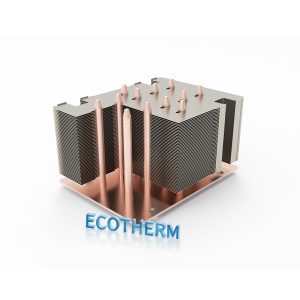
Most heat sinks use materials that move heat fast. Aluminum and copper are common choices. Aluminum is light and easy to shape. Copper moves heat even faster, so it is used in powerful systems. Some heat sinks use both materials for better results. Here is a table that shows the main materials and their uses:
| Material | Thermal Conductivity (W/m·K) | Advantages | Applications |
|---|---|---|---|
| Aluminum | 205 | Lightweight, cost-effective, easy to manufacture, malleable for complex designs | Everyday electronics like laptops and LED lighting systems |
| Copper | 400 | Superior thermal conductivity, rapidly draws heat away from components | High-performance applications like gaming PCs and servers |
| Hybrid | N/A | Combines benefits of both materials for effective cooling | Specialized systems with high-performance needs |
Heat sinks often work with airflow in regular modules. Fans blow air over the fins to help carry heat away. This works well for slower systems. Faster optical modules need better cooling methods.
Liquid Cooling Methods
Liquid cooling is a better way to control heat in fast optical modules. You can use different ways to move heat away from hot parts. Here are the main types:
| Cooling Method | Description |
|---|---|
| Indirect Liquid Cooling | The cooling liquid does not directly contact the heat source, e.g., cold plate design. |
| Direct Liquid Cooling | The cooling liquid directly contacts the heat source, including immersion and spray cooling. |
| Immersion Cooling | Can be single-phase or two-phase, depending on whether the cooling medium undergoes a phase change during operation. |
Indirect liquid cooling uses a cold plate. The plate sits on top of the hot part. Liquid flows through the plate and takes heat away. The liquid does not touch the chip or laser. This method is safe and easy to use in many systems.
Direct liquid cooling puts the cooling liquid right on the hot part. This cools the part faster. Immersion cooling is a special kind of direct cooling. You put the whole optical module in a special liquid. The liquid pulls heat away from every part. This works well for very hot or crowded systems.
Immersion and Direct-to-Plug Cooling
You can pick immersion cooling or direct-to-plug cooling. Each way has its own good points.
- Immersion cooling means you put the whole optical module in a bath of special liquid. The liquid does not conduct electricity, so it is safe for electronics. This method cools every part evenly. You get better heat transfer and lower temperatures. Immersion cooling helps your module run faster and last longer. It also saves space because you do not need big fans or air ducts.
- Direct-to-plug cooling uses a closed loop. The cooling fluid flows through a plate or channel that touches the hot part. This way is easier to add to systems you already have. It works well for many setups, but you may still need some air cooling.
Here are some key points to help you compare:
- Immersion cooling gives you the best heat transfer and energy savings. It keeps all parts cool and steady.
- Direct-to-plug cooling is easier to install in most systems. It may not cool as well as immersion, but it still helps a lot.
- Immersion cooling costs more at first, but it can save money over time by using less energy.
Note: Immersion cooling lets you run your optical module at higher speeds and with more stability. You also use less energy and can fit more modules in a small space.
When you compare liquid cooling to air cooling, you see big differences. Liquid cooling moves heat away much faster. It keeps your optical module at a safe temperature, even when you use it for heavy tasks. You get better performance and fewer problems. Air cooling works for simple jobs, but liquid cooling is best for high-speed and high-power systems.
Benefits of Liquid Cooling
Enhanced Thermal Management
High-density systems need good heat control. Liquid cooling helps remove heat from busy places. This keeps equipment safe. In data centers, many optical modules sit close together. Air cooling cannot handle all the heat from these strong chips. Liquid cooling fixes this problem.
- Liquid cooling takes heat away fast from tight spaces.
- You can lower case temperatures by 10–15 °C at full power.
- The market for liquid-cooled data centers is growing quickly and could be worth over 20 billion dollars by 2027.
Liquid cooling helps your systems work well, even when they are busy.
Energy Efficiency and Reliability
You want your systems to use less energy and last longer. Liquid cooling helps with both. It uses less power than air cooling. You do not need big air conditioners as much. This saves money on energy bills.
| Cooling Type | Energy Efficiency |
|---|---|
| Liquid Cooling | 30% more efficient |
| Air Cooling | Baseline |
Liquid cooling lowers the power usage effectiveness (PUE) ratio. Lower PUE means your system works better. Keeping temperatures low reduces stress on parts. This helps your optical module last longer and break less often. Some systems see reliability get up to three times better than older designs.
Impact on Performance
Liquid cooling gives you better performance. Stable temperatures help your optical module keep its speed, even when working hard. Liquid cooling keeps the wavelength steady and increases optical output. Your system stays reliable, even when temperatures change a lot. You can trust your equipment to work well in tough conditions.
Tip: If you want high performance and long life for your systems, liquid cooling is a smart choice.
Applications and Challenges
Data Centers and Communication Systems
Liquid-cooled optical modules are used where fast data is needed. Data centers use them to keep servers cool. These servers handle lots of information. Communication systems use these modules for fast internet and phone networks. High-performance computing uses liquid cooling for powerful machines.
Liquid cooling solves problems that air cooling cannot fix. Here are some reasons why these modules are used:
- Efficient heat control keeps equipment stable.
- Energy savings help lower power bills and protect nature.
- Better reliability stops overheating and keeps networks working.
- Future-ready design works with new tech like AI and fast networks.
Technical and Maintenance Considerations
You need to think about setup and care before picking a cooling method. Liquid-cooled systems need pumps, pipes, and special fluids. You must check for leaks and keep the fluid clean. Sensors watch temperature and flow, but you need to check them often.
Air-cooled systems use fans and heat sinks. These are easier to put in and need less care. You just clean the fans and make sure air moves well. Liquid cooling costs more at first, but it saves money later by using less energy and keeping equipment safe.
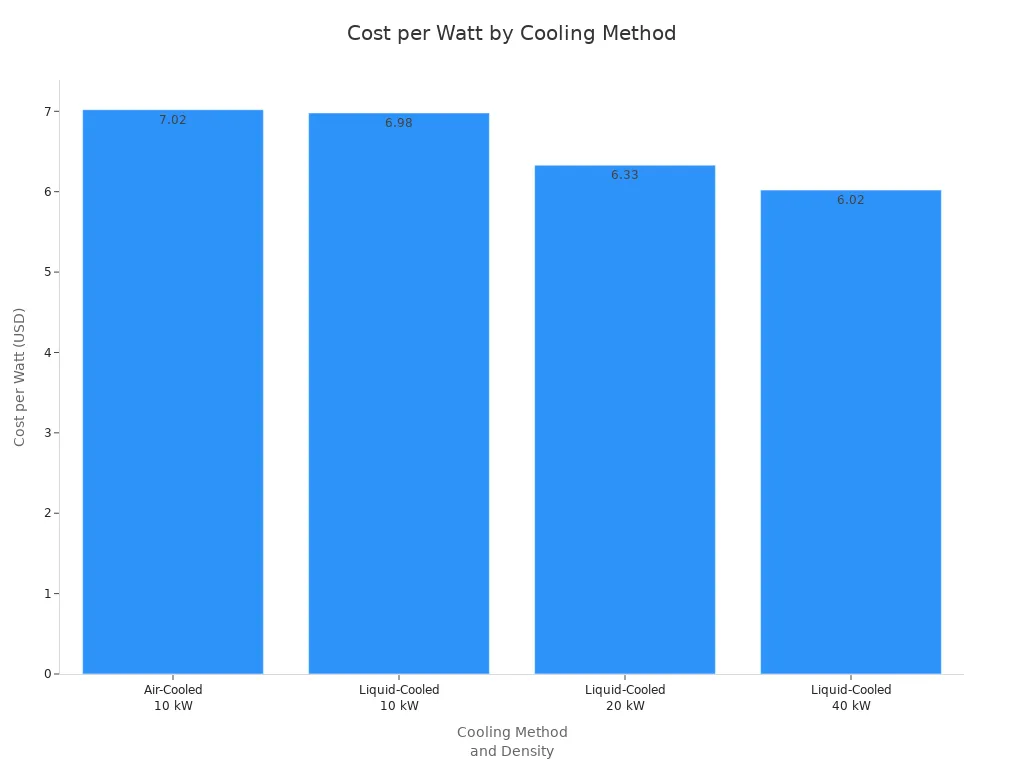
Here is a table that shows cost differences for air-cooled and liquid-cooled systems at different power levels:
| Cooling Method | Cost per Watt | Density | Savings Compared to Air-Cooled |
|---|---|---|---|
| Air-Cooled | $7.02 | 10 kW | N/A |
| Liquid-Cooled | $6.98 | 10 kW | N/A |
| Liquid-Cooled | $6.33 | 20 kW | 10% |
| Liquid-Cooled | $6.02 | 40 kW | 14% |
Water Cooling vs. Traditional Heat Sink Comparison
Effectiveness and Efficiency
Water cooling moves heat away faster than heat sinks. You get lower temperatures and better performance in crowded places. Heat sinks work for simple jobs, but not for strong systems.
Technical Challenges
Water cooling needs careful setup. You must stop leaks and keep the system clean. Pumps and pipes make things harder. Heat sinks are easier to put in and care for. You just check for dust and make sure air flows.
Cost Implications
Liquid cooling costs more at first. You pay for pumps, pipes, and fluids. Over time, you save money because the system uses less energy and lasts longer. The table above shows liquid cooling saves more as power goes up.
Maintenance Requirements
You need to check liquid-cooled systems often. Look for leaks and keep the fluid clean. Change pumps when needed. Air-cooled systems need less care. Clean the fans and check for dust.
Suitability and Preferred Scenarios
Pick water cooling for fast networks or crowded spaces. It works best for data centers, high-performance computing, and busy places. Use heat sinks for simple setups or easy care.
Tip: If you want the best cooling for your optical module in a busy place, water cooling gives you better results and saves money over time.
You use liquid-cooled optical modules to keep fast systems cool. These modules move heat away much faster than air cooling. This helps save energy and makes data centers quieter. You can fit more modules in the same space.
| Benefit | Description |
|---|---|
| Superior Thermal Management | Handles heat in tight spaces and keeps modules safe. |
| Improved Reliability | Stops overheating and helps equipment last longer. |
| Energy Efficiency | Uses less power and helps green data centers. |
| Higher Density | Lets you add more modules for strong computing and AI. |
| Noise Reduction | Makes less fan noise for a quieter place to work. |
- More people are using liquid-cooled modules every year.
- Many groups pick these for better performance and to help the planet.
- Immersion and cold plate cooling help with new data needs.