Cold plate cooling in data centers
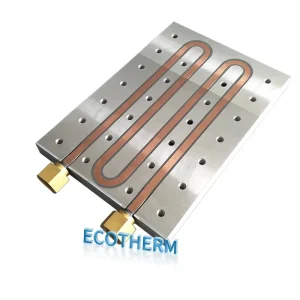
You see more servers in data centers now, and data center cooling has become a top priority. Cold plate cooling uses metal plates with liquid channels to efficiently pull heat away from computer chips. These cold plates act as a data center heat sink, helping keep equipment cool and ensuring everything runs smoothly. Energy efficiency, reliability, and compatibility are crucial for modern data centers. With high-density computing growing rapidly, custom cold plate solutions are more important than ever.
The average power per cabinet used to be 1-3kW, but now it’s 8-10kW.
Many setups now require 35-45kW per cabinet, and some could soon need 70-80kW.
AI and high-performance computing are driving data center cooling needs even higher.
Cold plate cooling is a smart solution for today’s data centers. Custom cold plate designs provide the flexibility needed to meet unique requirements, and they serve as an effective data center heat sink. If you want to keep up with the demands of modern computing, you need cold plate cooling—traditional methods just can’t handle today’s needs.
Key Takeaways
Cold plate cooling takes heat away from servers fast. This helps servers work well in busy data centers.
Custom cold plate designs give special cooling for each need. This makes energy use better and can cut costs by up to 60%.
Using cold plate cooling can help save energy. It may lower cooling costs by 27% to 40% compared to air cooling.
Cold plate systems need less care than air cooling. This means fewer problems and cheaper upkeep over time.
Good planning and working with experts are needed to use cold plate cooling in old data centers.
Cold plate technology in data centers
How cold plate cooling works
Cold plate cooling is a smart way to keep servers cool. Cold plates have channels filled with coolant. The coolant moves heat away from hot parts like CPUs and GPUs. It flows through the channels and picks up heat. Then, it carries the heat to a radiator or heat exchanger. This keeps equipment safe from getting too hot.
Cold plates use coolants to move heat away from hot parts.
When a cold plate touches a chip, it takes in heat and moves it through its channels.
The coolant inside brings the heat to a radiator, where it lets the heat out.
Cold plates work better than air-based heat sinks. They use liquids or special materials to pull heat away. This makes them great for cooling crowded data centers. Cold plate cooling helps electronics stay reliable and work well.
The most common fluids in these systems are:
Water
Glycol mixtures
Dielectric fluids
Non-contact and compatibility features
Some people worry that liquid cooling might hurt their hardware. Non-contact liquid cooling uses corrosion inhibitors to stop this. These additives make a shield on metal surfaces. The shield stops bad reactions between metals like aluminum and copper. This is important because many systems use different metals. The inhibitors keep all the metals safe.
Adding cold plate cooling to old data centers can be hard:
Most old data centers use air-cooling, so adding liquid parts is tough.
You might need to change your setup to add pumps, cold plates, and other parts.
Old servers may not fit direct cooling, which can cause problems.
Putting in new cooling can mean some downtime for your business.
Still, many cold plate systems let you upgrade just some parts. You do not have to replace everything at once. You can keep your data center running while you improve cooling step by step.
Custom cold plate solutions
Each data center is different, so custom cold plates work best. Store-bought cold plates may not fit or cool enough. Makers study your needs and use thermal maps to plan the best flow paths. They look at the size, shape, and spot of heat sources. This helps the cold plate work well as a heat sink.
Here are some common ways to customize:
Designs made for your system’s needs
Changed flow paths for better heat transfer
Special shapes and sizes for your hardware
Placement based on where the most heat comes from
Custom cold plates help a lot in big data centers. Engineers use tools like CFD to see how well a design will work. They want even temperatures for all parts. This helps your equipment last longer and work better. Good cooling and low energy use are both important. If the design is too hard, it uses more energy. If it is too simple, it may not cool enough. The right custom cold plate saves energy and keeps your data center cool.
Factor | Impact on System |
|---|---|
Pump Speed | Changes how fast coolant moves |
Radiator Size | Decides how much heat gets out |
Tubing Diameter | Affects how hard it is to flow |
Coolant Type | Changes how well heat moves |
Tip: Work with experts to make a custom cold plate for your data center. This helps you get the best cooling and save energy.
Benefits of cold plate cooling
Energy efficiency and free cooling
You can save a lot of energy when you use cold plate cooling in your data center. Cold plates let you cool your servers with less power than air cooling. Dr. Sarah Chen, a leader in thermal engineering, found that liquid cooling solutions like cold plates have grown by 35% in data centers over the past two years. This change brings average energy savings of 27% compared to traditional air cooling. In some cases, you might see a 40% drop in cooling energy costs.
Cold plate systems also help you use free cooling for longer periods. These systems allow higher coolant temperatures, so you can use outside air or renewable energy more often. This extends your free cooling window by 30% to 50% compared to air cooling. You get more time when you do not need to run chillers, which saves even more energy.
Higher power density and data center heat sink
Cold plate cooling supports higher power density in your racks. You can run more powerful servers without overheating. This is important as data center cooling needs keep rising. Cold plates act as a data center heat sink, pulling heat away from CPUs and GPUs during heavy tasks. They move the heat into a liquid, which then goes to a remote heat exchanger.
Here is a look at how different cooling methods handle power density:
Power Density (kW/rack) | Cooling Method |
|---|---|
200 | Two-phase direct-to-chip cooling |
1,000+ | Two-phase direct-to-chip cooling |
Cold plates are crucial for managing high heat loads in high-performance computing clusters. They make sure your equipment stays safe and works well, even when you push it hard.
Cold plates help you handle more heat in less space.
They keep your data center heat sink working efficiently.
Reduced operational costs
Switching to cold plate cooling can lower your operational costs by 30% to 60%. Some projects have seen cooling-related cost drops of up to 50%. The amount you save depends on your starting energy use, local energy prices, and the size of your data center. When you use a custom cold plate design, you can target the hottest spots and get the best results.
Tip: Lower energy use means you spend less money and help the environment. Cold plate cooling makes your data center cooling smarter and more cost-effective.
Challenges and limitations
Maintenance and reliability
Cold plate cooling systems need less work than air cooling. They use a closed-loop system, so dust is not a big problem. Fans do not wear out as fast. This helps your data center run longer without trouble. Look at this table to see the differences:
Maintenance | Cold Plate Cooling | Air Cooling |
|---|---|---|
Frequency | Minimal (closed-loop system) | Frequent (dust, fan wear) |
Maintenance Burden | Lower | Higher |
Mechanical Parts | Fewer, less wear and tear | More, frequent maintenance |
You will not spend much time fixing fans or cleaning filters. Cold plate systems have fewer moving parts, so they break less often. But you still need to check for leaks and make sure pumps and connections are good. If a leak happens, it can cause damage fast. Your team must know how to spot problems early and handle liquid safely.
Note: Cold plate cooling means less work, but you must watch for leaks and pump problems.
Scalability in data center cooling
Making cold plate cooling bigger in large data centers is hard. You need modular parts that are easy to fix or change. As you add more servers, you get more connections. This makes the system harder to manage. You might need to change your racks and server setups to fit new cooling parts.
Changing old data centers for liquid cooling is not easy.
You must plan for space, layout, and extra work.
Racks and servers get more complex.
Cold plate cooling can be very energy efficient, with PUE below 1.1. This is better than air cooling, which often has a PUE of 1.6. You get better cooling, but you must balance flow rates and pump power. If you want more flow, pumps use more energy.
Tip: Plan your setup well before making cold plate cooling bigger. This helps you avoid big changes and keeps your data center working well.
Cold plate vs. other cooling methods
Air cooling comparison
Most computers use air cooling. Fans blow air over heat sinks. This helps move heat away from chips. Air cooling works for simple servers and office computers. Data centers need more space for air cooling. They also need bigger equipment. Air cooling does not work well with crowded racks. It struggles with powerful chips.
Cold plate cooling uses liquid to take heat away from chips. It works better for strong servers, like ones used for AI. It is also good for scientific computers. Look at the table below to see the differences:
Metric | Liquid Cold Plate | Air Cooling Plate |
|---|---|---|
Cooling Efficiency | Excellent (>500W chips) | Moderate (up to 250W) |
Noise Level | Low (pump dependent) | Higher at full speed |
System Complexity | High (pump, coolant) | Low (plug-and-play) |
Maintenance | Fluid checks needed | Maintenance-free |
Cost | Higher upfront | Lower |
Space Requirement | Compact integration | Bulkier for high-end coolers |
Reliability | High if sealed properly | Extremely high |
Application Suitability | AI servers, HPC, GPUs | Office PCs, entry-level |
Liquid cold plates cool high-power chips better. Air cooling uses more energy because fans work harder. Cold plates save space and make less noise.
Liquid immersion and direct-to-chip
Liquid immersion cooling puts servers in tanks with coolant. This method removes heat very well. But it makes hardware choices harder. You must change your setup. You spend more money at first. You also need new ways to care for equipment.
Cold plate cooling gives strong cooling without full immersion. It cools only the hottest parts, like CPUs and GPUs. You can upgrade your data center step by step. Direct-to-chip cooling is like cold plates. It may use different fluids or designs.
Here is a table to show the main challenges:
Challenge | Cold Plate Cooling | Liquid Immersion Cooling |
|---|---|---|
Maintenance Complexity | Moderate | High |
Initial Investment | Moderate | High |
Fluid Management | Low | High |
Retrofitting Complexity | Moderate | High |
Equipment Handling | Moderate | High |
Tip: Cold plate cooling works well in most data centers. You get strong cooling and easy upgrades. Liquid immersion is best for special cases. It needs more planning and costs more.
Implementation and future trends
Steps for deploying custom cold plate systems
You can put a custom cold plate system in your data center by following some key steps. These steps help you get good results and stop problems before they start:
Accurate Thermal Load Assessment
First, check how much power and heat each rack makes. This helps you find hot spots and plan cooling.Hardware Compatibility and Vendor Coordination
Make sure your cooling system fits your servers and other hardware. Work with vendors to keep warranties and specs safe.Infrastructure and Retrofit Feasibility
Look at your building to see where liquid cooling can go. Plan where pipes and cooling units will be placed.Leak Prevention and Emergency Preparedness
Use strong, double-sealed connections for safety. Make a plan for what to do if a leak happens.Operations and Maintenance Readiness
Train your team to handle fluids safely. Set up a schedule for regular checks.
Tip: Careful planning and working with vendors make your cold plate project easier.
Innovations in data center cooling
New ideas in data center cooling help you keep up with more power needs. Many companies use advanced cold plate designs and smart controls now. Here are some new innovations:
Innovation | Description |
|---|---|
Dynamic® Cold Plate | This system cools chips in AI servers and lowers fluid risks. |
DeltaFlow~™ | This technology works with many cooling setups and is great for AI clusters. |
AI-driven systems control cooling in real time. Sensors watch temperatures and change cooling as needed. You can cool strong chips like CPUs and GPUs more easily. Cold plate cooling supports racks with up to 100 kW, much more than air cooling. You use less energy and lower your carbon footprint. As AI and high-performance computing grow, you will see more direct-to-chip cooling and smarter controls in data centers.
Cold plate cooling helps you save a lot of energy. It also works well for high-density computing. But there are some problems to think about. You may have to pay more money at the start. The system design can be tricky. You also need to handle fluids carefully. To know if cold plate cooling is right for your data center, look at your space and how much upgrades will cost. Think about how much work it takes to keep things running. Use copper parts and smart inlet designs to make cooling better. Always check your cooling systems with sensors. Change your plan when new technology comes out. If you stay ready, your data center will work well and be ready for the future.
FAQ
A cold plate is a metal plate with channels for coolant. You use it to pull heat away from computer chips. This helps your servers stay cool and work better.
You can add cold plate cooling to older data centers. You may need to change some hardware and plan for new pipes or pumps. Many systems let you upgrade step by step.
You should check pumps, connections, and coolant levels every few months. Cold plate systems need less cleaning than air cooling. You must watch for leaks and fix them quickly.
Cold plate cooling uses special fluids and corrosion inhibitors. These protect your hardware from damage. You must follow safety steps and use the right materials for your system.
Cold plate cooling can lower your energy bills. You use less power for cooling, which saves money over time. Many data centers see big drops in operational costs.