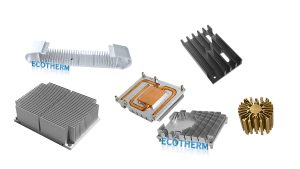
Aluminum heat sink design
To create an effective aluminum heat sink design, you should focus on three key factors. First, maximize airflow to enhance cooling efficiency. Next, increase the surface area to improve heat dissipation. Finally, ensure there is a direct path for heat to escape. Aluminum is an excellent choice for heat sink design due to its lightweight nature and affordability. Additionally, it has good thermal conductivity, typically ranging from 136 to 205 W/(m·K).
While copper conducts heat almost twice as efficiently, aluminum remains a popular option because it performs well, is lightweight, and is cost-effective.
By applying these principles in your aluminum heat sink design, you can effectively manage heat in a variety of electronic devices.
Key Takeaways
Make sure air moves well to help cooling work better. Use fans or shape fins to move air the right way. Add more surface area to let heat escape faster. Fins can give more area without making it bigger. Pick aluminum because it is light, cheap, and lets heat move easily. Make a straight path from the heat source to the heat sink for best cooling. Do not make mistakes like blocking air or using the wrong design. This will help the heat sink work well.
Aluminum heat sink design basics
Thermal management principles
Before you start with aluminum heat sink design, you need to know some basics about thermal management. Good thermal management helps keep devices cool and working well. Here are some important things to remember:
Pick the right material. Aluminum is light and cheap. Copper moves heat better, but it is heavier and costs more.
Make the surface area bigger. More surface area lets more heat get out. Fins help add more area.
Make sure air can move well. Airflow takes heat away from the heat sink. You can use fans or shape the fins to help air move.
Think about where the device is used. Hot rooms or bad airflow make cooling harder. Sometimes you need fans or a new design.
If you follow these tips, your aluminum heat sink will work better.
Why choose aluminum
It is important to know why aluminum is a good choice for heat sinks. Aluminum gives you a good mix of performance, price, and weight. The table below shows how aluminum compares to other metals:
Metal | |
|---|---|
Aluminum | 237 |
Copper | 401 |
Stainless Steel | 15–20 |
Steel | 50 |
Glass | 1 |
Aluminum moves heat much better than steel or glass. It does not move heat as well as copper, but it is much cheaper. Aluminum heat sinks cost about one-third of what copper ones do. They are also lighter. This makes aluminum heat sinks great for laptops and portable devices. Copper heat sinks are heavier and work best in big, still systems.
Tip: If you want to save money and make your device lighter, pick aluminum for your heat sink.
This is why aluminum heat sink design is used a lot in electronics, LED lights, and power devices.
Key design factors
Surface area and fin geometry
You can boost the cooling power of your heat sink by increasing its surface area. More surface area means more heat can move from the metal to the air. Fins help you add surface area without making the heat sink much bigger. The shape and spacing of fins matter a lot. If you pack fins too close, air cannot flow well. If you space them too far apart, you lose surface area.
Increasing surface area gives better heat transfer.
Fin arrangement is key. High fin density adds area but can block airflow.
Different fin shapes, like rectangular or pin fins, change how well the heat sink works.
Pin fin shapes can raise heat transfer by 16% compared to other designs.
Some methods, like skiving, let you make very thin and tall fins. This means you can fit more fins in the same space, which helps your aluminum heat sink design work better.
Airflow optimization
Airflow is just as important as surface area. You need to make sure air can move freely around and through the fins. Good airflow takes heat away from the heat sink fast. If air gets trapped or blocked, the heat sink cannot cool well. You can use fans or design the fins to guide air in the right direction.
Factor | Description |
|---|---|
Fin spacing and orientation | Proper spacing is crucial; too close restricts airflow, while too far apart reduces surface area. |
System integration | Early planning of materials and enclosure helps avoid clearance issues and ensures good airflow. |
Plan your design so that nothing blocks the air path. This helps keep your device cool.
Direct thermal path
A direct thermal path lets heat move quickly from the hot part to the heat sink. Aluminum has high thermal conductivity, about 167 W/m-K. This means heat spreads fast across the heat sink. You should mount the heat sink as close as possible to the heat source. Fewer layers between the source and the heat sink mean better cooling.
Tip: Always check that your heat sink touches the heat source directly for best results.
When you focus on these key factors, your aluminum heat sink design will handle heat much better.
Step-by-step aluminum heat sink design
Designing an aluminum heat sink can seem hard, but you can break it down into simple steps. You will learn how to calculate heat dissipation, pick the right aluminum, choose the size and shape, and set the best fin spacing and orientation. These steps work for many devices, like PCBs, LED lights, and power electronics.
Calculating heat dissipation
You need to know how much heat your device makes. This helps you pick the right heat sink. Follow these steps:
Calculate Power Consumption
Use the formula:Power (P) = Voltage (V) × Current (I)
This gives you the power in watts.Determine Thermal Resistance
Use:Temperature Rise (ΔT) = Power (P) × Thermal Resistance (Rth)
This shows how much the device will heat up.Apply Fourier’s Law for Conduction
Use:Q = k × A × (Thot - Tcold) / d
Here, Q is heat transfer, k is thermal conductivity, A is area, Thot and Tcold are temperatures, and d is thickness.Calculate Convective Heat Transfer
Use:Q = h × A × (Tsurface - Tair)
h is the heat transfer coefficient. This step helps you see how well the heat sink cools with air.
Tip: Write down all your numbers. This helps you check your work and pick the right heat sink.
Selecting aluminum grade
You must choose the right type of aluminum for your heat sink. Most heat sinks use grades like 6061 or 6063. These grades have good thermal conductivity and are easy to shape. Grade 6063 is common for extruded heat sinks because it cools well and costs less.
6061: Strong and good for machining.
6063: Best for extrusion and has high conductivity.
Note: For most electronics, 6063 works well. If you need more strength, pick 6061.
Sizing and shaping
The size and shape of your heat sink depend on your device and where you will use it. You need to match the heat sink to the heat your device makes. Look at the table below to help you decide:
Factor | Description |
|---|---|
Current Load and Heat Output | Match the heat sink to the device’s heat production. |
Operating Environment | Choose based on natural or forced air cooling. |
Form Factor and Space | Fit the heat sink into your device’s space. |
You also need to think about these constraints:
Constraint | Key Considerations |
|---|---|
Size (mm) | |
Weight (g) | Check that your PCB can hold the heat sink. |
Mounting | Pick how you will attach the heat sink. |
Follow these steps:
Gather key thermal numbers: TDP (thermal design power), Tmax (max temperature), and Tambient (room temperature).
Check size, weight, and mounting options.
Decide if you want passive (no fan) or active (with fan) cooling.
Tip: Always measure your space before you buy or make a heat sink.
Fin spacing and orientation
Fin spacing and direction matter a lot in aluminum heat sink design. Fins help move heat to the air. If you space fins too close, air cannot flow. If you space them too far, you lose surface area.
Fin Spacing | Airflow Behavior | Cooling Result |
|---|---|---|
Restricted airflow | Overheating risk | |
1.5–3.0 mm | Balanced flow | Best for natural or forced air |
>4.0 mm | Air moves freely | Less surface contact, less cooling |
For most electronics, use fin spacing between 1.5 mm and 3.0 mm.
Place fins so air can move through them easily.
For devices with fans, you can use tighter fin spacing.
Tip: Point the fins in the same direction as the airflow for best cooling.
By following these steps, you can design a heat sink that keeps your device cool and safe. You will find that careful planning leads to better results in all your projects.
Common mistakes in aluminum heat sink design
Making aluminum heat sinks can be hard. Sometimes, mistakes happen that make cooling worse. Here are some usual problems and how to fix them.
Airflow limitations
Cooling drops if air cannot move through the heat sink. This problem happens with old ways of making heat sinks, like extrusion. These ways limit how you can shape fins and surface area. Bad airflow keeps heat stuck inside.
Fins too close together stop air from moving.
Flat surfaces do not help air move.
Simple shapes miss chances for better cooling.
Newer ways, like Direct Metal Laser Sintering (DMLS), let you make tricky shapes. DMLS gives more surface area and better airflow. You get better cooling without needing fans.
Tip: Pick designs that let air move easily. Use new making methods if you need more cooling.
Manufacturing constraints
You must think about how your heat sink will be made. Some designs look good but are hard to make. If you skip making rules, you may pay more or get weak parts.
Parameter | Minimum for Aluminum | Minimum for Copper |
|---|---|---|
Fin Thickness | ≥ 0.8 mm | ≥ 1.0 mm |
Fin Spacing | ≥ 1.5 mm | ≥ 1.8 mm |
Fin Height (H/D) | ≤ 6:1 | ≤ 4:1 |
Vertical fins are best for natural airflow.
Angled or staggered fins help with forced airflow.
Do not use deep pockets or sharp corners. These make building harder and cost more.
Hard shapes may need special tools, which cost more for small batches.
Note: Always check if your design fits the way you plan to make it.
Application mismatch
You need to match your heat sink to your device and where it will be used. The wrong design can cause overheating or waste money.
Aspect | Impact on Performance |
|---|---|
Material Choice | Some alloys move heat better than others. |
Bad spacing or height traps air and cools less. | |
Machining Accuracy | Uneven surfaces make it harder for heat to move. |
Surface Finish | Smooth surfaces move heat better. |
Production Method | Extrusion, CNC, and casting change cost and how it works. |
Tip: Test your heat sink in real life. Make sure it fits your device and cools well.
If you skip these mistakes, your aluminum heat sink will work better and last longer.
Application examples
Electronics cooling
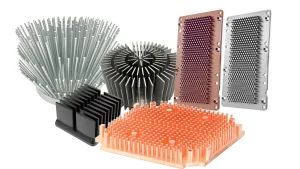
Aluminum heat sinks are used in many electronics. They help keep things like computers and routers cool. There are two main types of heat sinks. Passive heat sinks use air that moves on its own. These do not need fans. Active heat sinks use fans to move air faster. This cools the device better. Many companies make special heat sinks for different devices. These often have flat bases and tall fins. The fins spread out the heat and protect the electronics.
Passive heat sinks use convection to cool.
Active heat sinks use fans for more cooling.
Custom designs can fit many kinds of devices.
Tip: You can make cooling better with new ways to build heat sinks. Some new methods make heat sinks more exact and work better. Some heat sinks use phase change materials to soak up extra heat. Smart systems can change how much cooling is needed by checking the temperature.
Advancement | Description |
|---|---|
Make heat sinks more exact and work better. | |
Phase Change Materials (PCMs) | Soak up and let out heat when they change form. |
Thermal Management Algorithms | Change cooling power as the temperature goes up or down. |
LED lighting
Aluminum heat sinks are important for LED lights. LEDs get hot when they are on. You need to cool them so they last longer and stay bright. Extruded aluminum heat sinks move heat away well. You can shape them in many ways for different lights. Making the surface bigger and using smart fin shapes helps air move and cool the LEDs.
Aspect | Description |
|---|---|
Thermal Conductivity | Extruded aluminum moves heat away from LEDs well. |
Design Flexibility | Light and bendy designs fit many lights. |
Surface Area Optimization | More surface and better fin shapes cool LEDs more. |
Anodizing the surface helps stop rust and cools better.
Smart fin shapes and surface treatment keep LEDs cool.
Note: An LED heat sink takes in and lets out heat from the LED chips. Good heat flow stops too much heat and keeps LEDs working well.
Power devices
Aluminum heat sinks are used in power devices like amplifiers and motor controllers. These parts get very hot. You need a heat sink with low thermal resistance to stop overheating. Aluminum is a good choice because it works well and costs less than copper. You can pick different fin shapes to help air move and cool the device.
Design Consideration | Description |
|---|---|
Thermal Resistance | |
Material Selection | Aluminum works well and costs less than copper. |
Fin Geometry and Shape | Fins add more surface and help air move. |
Surface Treatment and Coatings | Anodized and black coatings help send out heat. |
Thermal Interface Materials | Fill spaces between the chip and heat sink for better cooling. |
Tip: Always use thermal interface materials to fill spaces between the chip and the heat sink. This helps lower the temperature and keeps your power devices safe.
You can make a good aluminum heat sink by following some simple steps. First, put parts close to the cooling pieces. Next, pick the right aluminum alloy, like 6063. Add more surface area by using smart fin shapes. Make sure the fin spacing and direction match how air moves. Pick a way to make the heat sink that fits your design.
Try not to block airflow or use fins that are too thin to build. Always make sure your design fits what your device needs. The table below shows how special features can help your heat sink work better:
Benefit | |
|---|---|
Variable fin spacing | Better cooling in hot spots |
Pin fin designs | Good for all airflow directions |
Enclosure integration | Saves space and weight |
FAQ
What is the best aluminum grade for heat sinks?
You should choose 6063 aluminum for most heat sinks. It offers high thermal conductivity and is easy to shape. If you need more strength, pick 6061 aluminum.
How do I know if my heat sink is big enough?
Check your device’s heat output. Use the formula:Heat Sink Size = Power (W) × Thermal Resistance (°C/W)
Make sure the heat sink keeps your device below its safe temperature.
Can I use a fan with my aluminum heat sink?
Yes, you can add a fan to boost cooling. Fans move air faster over the fins. This helps your heat sink remove heat more quickly.
Why do fin shapes matter?
Fin shapes change how air moves and how much heat escapes. Pin fins work well for many airflow directions. Thin, tall fins add surface area but need good airflow.
How do I attach a heat sink to my device?
You can use clips, screws, or thermal adhesive. Always make sure the heat sink touches the heat source directly. Use thermal paste to fill gaps and improve heat transfer.