Custom Heat Sinks and Cold Plates for HPC Cooling Solutions
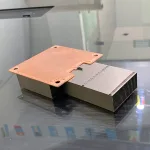
High-performance computing systems generate a great deal of heat, and managing it is a major challenge for data centers and technical teams. Without effective HPC cooling solutions, servers can lose efficiency, consume more energy, and face a higher risk of failure. Custom heat sinks and cold plates offer a practical way to improve heat control and keep demanding systems running smoothly. Ecothermgroup provides solutions designed to support this level of thermal performance.
HPC Cooling Challenges
HPC cooling solutions have to deal with a simple but harsh reality: modern servers put far more heat into a smaller space than older air-cooled racks were designed for. In AI data center cooling and high performance computing cooling, the hottest chips can reach very high heat flux, so the cooling system must move heat away quickly while keeping thermal resistance low. This is why Ecothermgroup and other suppliers often design a custom heat sink, server heat sink, or liquid cold plate around the exact chip, board, and rack layout instead of relying on a one-size-fits-all part.
Recent industry guidance shows how quickly the limits are changing. NVIDIA has described newer AI servers that can run with much warmer coolant while still staying within validated limits, which shows that direct-to-chip cooling and chip-level cooling are now central to HPC thermal management. At the same time, ASHRAE has highlighted the server processor cold plate as a true heat exchanger, not just a mounting part, because its internal flow path strongly affects data center cooling solutions and system efficiency.
Heat Load in High-Density Systems
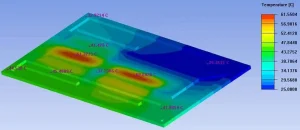
High-density server cooling is difficult because the heat is not spread evenly. GPUs, CPUs, HBM, and VRM areas can create local hotspots, and AI accelerator cooling often places the highest concentration of power on a small footprint. In practice, the cooling designer must control both average temperature and peak junction temperature, or the chip may throttle even if the rack looks stable overall.
| Challenge | Why it matters | Common solution |
|---|---|---|
| High power density | More watts per unit area raise heat flux | GPU cold plate or CPU cold plate |
| Uneven hotspots | Local peaks reduce performance | Custom liquid cold plate |
| Rack-level heat buildup | Air leaves the cabinet too hot | Rack-level cooling with CDU support |
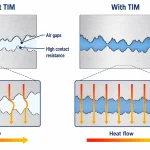
Because of this, HPC cooling solutions usually combine cold plate cooling with careful coolant flow rate control and a low pressure drop design. A well-made liquid cooling loop should remove heat close to the source, but it should also remain serviceable for long uptime and reduced leak risk. Material choice, sealing quality, and thermal interface quality all matter, because poor contact can undo the benefit of even a strong HPC heat sink or vapor chamber heat sink.
Limits of Air Cooling
Air cooling still has value, especially for lower-density servers and mixed hybrid air and liquid cooling setups, but it has clear limits in dense AI data center cooling. As power rises, fan speed and airflow must rise too, which increases noise, energy use, and pressure drop across the rack. In many cases, a heat pipe module or rear door heat exchanger can help, but they often cannot keep up when the chip load becomes too concentrated.
Common industry practice is to use air only where heat density is manageable and switch to a custom liquid cold plate or immersion cooling when cabinet power rises. This is not just about temperature; it is also about keeping thermal resistance low enough to protect CPU thermal management and GPU thermal management under sustained load. Even a well-designed HPC heat sink can struggle if the board layout leaves too little room for airflow or if adjacent parts, such as HBM cooling and VRM cooling areas, add extra heat.
Why Liquid Cooling Matters
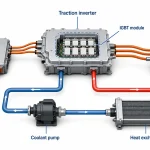
Liquid cooling matters because it moves heat more directly and with better control. In modern HPC liquid cooling, the cold plate sits close to the chip, so a liquid cold plate can absorb heat before it spreads across the board. That is why direct-to-chip cooling is now a standard path for many high power electronics cooling projects, especially where power density is rising quickly.
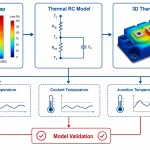
Compared with air-only systems, liquid cooling can support warmer coolant, lower fan demand, and better overall efficiency, but it still needs careful design. Engineers must balance thermal resistance against pressure drop, and they must verify the sealing, corrosion resistance, and maintenance plan before deployment. Typical best practice is to validate the CPU cold plate or GPU cold plate under real workload profiles, not just short bench tests, because long AI training runs can expose weak spots in the loop.
- Check chip contact and TIM quality first
- Match flow paths to the actual heat map
- Confirm service access for maintenance and refill
For this reason, many teams choose a custom heat sink or custom liquid cold plate from Ecothermgroup to fit the exact thermal and mechanical needs of the platform. In HPC cooling solutions, the challenge is not only removing heat, but doing it reliably at scale, with safe coolant distribution unit design and stable performance over the full server life.
Custom Heat Sinks
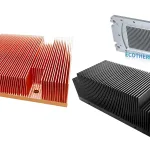
In HPC cooling solutions, a custom heat sink is not just a metal part; it is a carefully tuned thermal tool for a specific chip, rack, airflow path, and power limit. For modern AI data center cooling, AI servers can run with warmer coolant, but only when the full thermal stack, including the heat sink or cold plate, is designed for that operating window. In practice, this is why Ecothermgroup and other specialists treat high performance computing cooling as an application-specific job, not a one-size-fits-all choice.
Design Goals
The main goal is to keep thermal resistance low while controlling pressure drop and space use. In direct-to-chip cooling, the heat sink side of the design must spread heat quickly enough for high heat flux parts, while still fitting the board, socket, and service rules of the server. For CPU thermal management and GPU thermal management, the best designs support strong, even contact and reduce hot spots at the chip edge. This matters even more in high density server cooling, where air cooling alone often cannot keep up with rising power density.
| Design Goal | Why It Matters in HPC |
|---|---|
| Low thermal resistance | Improves chip-level cooling for CPUs, GPUs, and AI accelerators |
| Controlled pressure drop | Keeps coolant flow rate efficient in a liquid cooling loop |
| Strong mechanical contact | Reduces interface loss in server heat sink and liquid cold plate designs |
ASHRAE’s guidance on processor cold plates also supports this view: the cold plate is a heat exchanger, so its design strongly affects system reliability and energy use. A well-built custom heat sink or custom liquid cold plate can also simplify rack-level cooling when paired with a coolant distribution unit, rear door heat exchanger, or hybrid air and liquid cooling setup.
Materials and Finishes
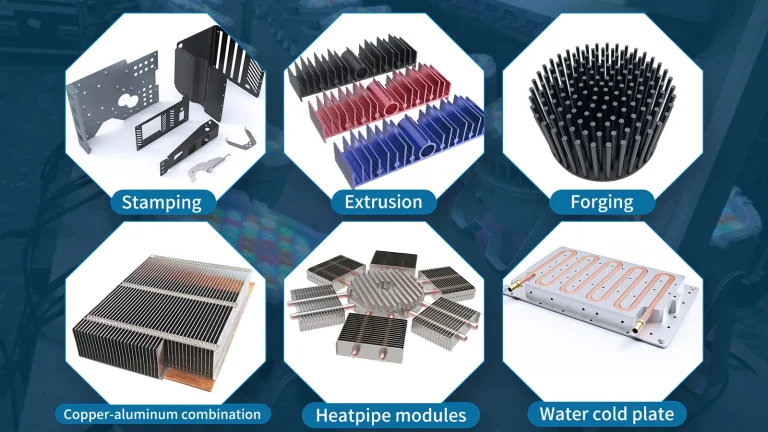
Material choice shapes both performance and service life. Aluminum is common for a lighter custom heat sink, while copper is often used when lower spreading resistance is needed. For HPC thermal management, fin geometry, base thickness, and finish quality all affect heat transfer and manufacturability. A vapor chamber heat sink or heat pipe module may help when heat must move sideways before leaving the part.
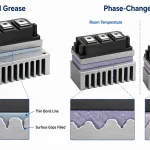
Surface finish and flatness are also important. Good interface materials lower contact loss, but poor machining or uneven plating can still raise thermal resistance. In high power electronics cooling, teams usually check corrosion risk, leak risk, and pressure testing, because maintainability is as important as raw performance.
Fit for CPUs and Accelerators
CPU cold plate and GPU cold plate designs are rarely identical. CPUs often need balanced coverage across a smaller footprint, while AI accelerator cooling may need stronger local cooling over HBM cooling, VRM cooling, and dense power zones. That is why custom heat sinks are matched to the exact package and board layout.
- Confirm chip power, footprint, and mounting limits.
- Match the sink or plate to airflow or coolant path.
- Verify thermal interface material and flatness.
- Test for temperature rise, pressure drop, and service access.
For HPC cooling solutions, this fit-for-purpose approach is the safest path. It helps teams choose between a server cold plate, vapor chamber heat sink, or other custom thermal part with confidence, while keeping the system ready for real data center cooling solutions and long-term operation.
Cold Plates in Liquid Cooling
Cold plates are a core part of HPC cooling solutions because they move heat away from the chip before it spreads through the server. In direct-to-chip cooling, a server cold plate sits on top of a CPU, GPU, or AI accelerator and carries liquid close to the hot surface. This is one reason high performance computing cooling is moving away from air-only designs in dense racks. NVIDIA’s recent guidance shows that newer AI servers can still stay within validated limits with much warmer coolant, which supports the idea that well-designed cold plate cooling can work efficiently in demanding systems. For Ecothermgroup and other suppliers of custom liquid cold plate parts, the main goal is to match the chip, the flow path, and the rack-level cooling plan.
How Cold Plates Work
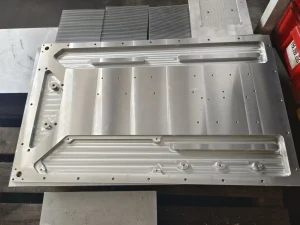
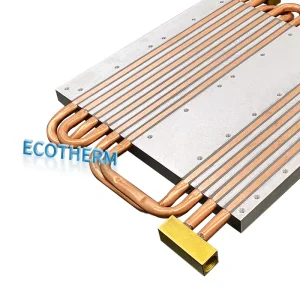
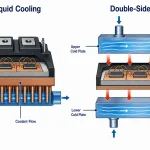
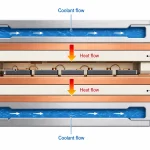
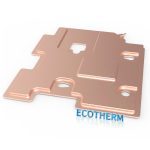
A liquid cold plate is a compact heat exchanger. Coolant enters internal channels, absorbs heat from the chip surface, and leaves warmer than it entered. This direct path makes chip-level cooling more effective than relying on a server heat sink alone, especially where heat flux and power density are high. ASHRAE also highlights the processor cold plate as a critical thermal part, not just a metal base, because its internal design strongly affects data center cooling solutions and long-term energy use.
In practice, a GPU cold plate, CPU cold plate, or even HBM cooling and VRM cooling plate may use different channel shapes, base thicknesses, and materials. Custom heat sink design in HPC often combines a custom liquid cold plate for the hottest parts with air cooling for other components, which is a common hybrid air and liquid cooling strategy.
| Component | Main Role | Common Use |
|---|---|---|
| CPU cold plate | Removes heat from processors | CPU thermal management |
| GPU cold plate | Handles high GPU heat load | GPU thermal management |
| AI accelerator cooling plate | Supports very high power density | AI data center cooling |
Coolant Flow and Heat Transfer
Coolant flow rate, pressure drop, and thermal resistance are the main design checks in HPC liquid cooling. Higher flow can improve heat removal, but it can also raise pump power and system stress. That is why engineers usually balance channel geometry against the liquid cooling loop and coolant distribution unit design. In real HPC cooling solutions, a good cold plate does not chase maximum flow alone; it aims for stable performance at the lowest practical pressure drop.
Common best practice is to size the plate for the actual rack-level cooling target rather than the chip in isolation. For example, a liquid cold plate for a GPU may need different flow behavior than a plate for a CPU heat sink or a high power electronics cooling module. Leak detection, service access, and easy commissioning also matter because maintenance downtime in a data center can be costly.
- Check allowable coolant temperature and flow range early in the design.
- Match the plate to the expected rack density and server layout.
- Verify sealing, fittings, and service access before deployment.
Impact on Thermal Performance
Well-made cold plates lower peak chip temperature, reduce throttling risk, and help keep performance stable under long HPC workloads. This is especially important in AI accelerator cooling, where load can change quickly and thermal margin can be tight. At the system level, cold plates can also reduce total cooling energy compared with air-only methods, which supports scalable HPC thermal management in modern data centers.
However, performance depends on the full system, not only the plate. The coolant chemistry, pressure drop, installation quality, and rack design all affect results. In many facilities, cold plates are paired with rear door heat exchangers, immersion cooling, or other rack-level cooling methods when heat loads are extreme. Operators should follow vendor limits, monitor for leaks, and plan maintenance so the liquid cooling loop remains reliable over time.
45°C Coolant and System Design
In HPC cooling solutions, a 45°C coolant target changes the overall system design. Instead of relying on cold supply water and large chiller loads, custom heat sinks and cold plates must move heat efficiently at the chip edge, where CPU thermal management, GPU thermal management, and AI accelerator cooling all happen at very high heat flux. NVIDIA’s recent guidance for newer AI servers shows that warmer coolant can still keep hardware within validated operating limits when the liquid-cooling stack is built around well-designed liquid cold plate and server cold plate hardware. This matches common practice in high performance computing cooling: the goal is not just to circulate liquid, but to keep the silicon in a safe range while improving energy use.
Warmer Coolant Benefits
Warmer coolant helps HPC liquid cooling because it reduces the need for aggressive chillers and can improve data center cooling solutions efficiency. In many racks, especially those using direct-to-chip cooling, this means the liquid cooling loop can run with less energy waste while still supporting high density server cooling. Ecothermgroup and similar suppliers often focus on custom liquid cold plate design because the plate must keep thermal resistance low even as coolant temperature rises.
The main benefit is system-level balance. A 45°C loop supports rack-level cooling strategies where the cold plate, manifold, and coolant distribution unit work together. That makes sense for GPU cold plate and CPU cold plate designs, since the chip is cooled at the source rather than waiting for room air to remove the heat.
| Design Factor | 45°C Coolant Impact |
|---|---|
| Chiller load | Lower demand in many installs |
| Thermal resistance target | Must stay tight at the chip level |
| Pressure drop | Needs careful control in the loop |
| Energy use | Often improved versus colder supply water |
Validated Operating Limits
At 45°C, the key rule is simple: the coolant can be warm, but the chip must stay inside validated operating limits. That is why validated testing matters for cold plate cooling, HBM cooling, and VRM cooling in AI data center cooling systems. Direct-to-chip cooling is widely used because it can remove heat at the source while keeping performance stable for CPUs, GPUs, and accelerators.
Designers also pay close attention to flow rate, pressure drop, and material compatibility. A custom heat sink may still be used for auxiliary parts, while a vapor chamber heat sink or heat pipe module can support hybrid air and liquid cooling where needed. For safe operation, the coolant should match the metals and seals in the system, and leak detection should be part of the plan.
- Confirm validated inlet and outlet temperature limits for each chip family.
- Check cold plate contact quality and mounting force.
- Balance manifold flow so one device does not starve another.
- Test the full loop under real rack power density.
Energy and Facility Advantages
Facility teams often choose 45°C coolant because it can support warmer-water operation in HPC cooling solutions without depending as much on cold air delivery. That can reduce fan work, ease building load, and improve rack-level cooling efficiency in dense installations. In some sites, it may also simplify integration with rear door heat exchanger, immersion cooling, or hybrid air and liquid cooling strategies.
For owners of high power electronics cooling systems, the benefit is practical: more heat removed per rack, less stress on room cooling, and better scaling for future GPUs. The tradeoff is that the thermal design must be disciplined. A server heat sink or HPC heat sink alone is not enough; the full path from chip to coolant must be validated. When that path is built well, 45°C coolant becomes a strong option for modern HPC cooling solutions.
Selecting the Right Solution
Application Requirements
Selecting the right HPC cooling solutions starts with the workload, not the hardware catalog. For AI data center cooling and high performance computing cooling, the main inputs are chip power, rack density, target temperature, and heat flux. NVIDIA has shown that newer AI servers can operate with warmer coolant, around 45°C, while still staying within validated limits, which makes liquid cooling a practical option for dense systems. In many sites, air cooling cannot remove enough heat once racks reach very high power density, so direct-to-chip cooling becomes the safer path.
A good rule is to match the component to the hottest device in the stack. A GPU cold plate may be the best fit for AI accelerator cooling, while a CPU cold plate or server cold plate may be better for CPU thermal management. HBM cooling and VRM cooling also matter because weak points can increase the total thermal resistance of the system. The ASHRAE view of the processor cold plate as a heat exchanger supports this approach: the cold plate is not just a part, but the main bridge between chip-level cooling and the liquid cooling loop.
| Workload | Typical Best Fit | Why It Fits |
|---|---|---|
| High-density AI training | Custom liquid cold plate | Handles high heat flux near the chip |
| Mixed CPU/GPU server | CPU cold plate and GPU cold plate | Targets the main heat sources directly |
| Hot rack with limited airflow | Rack-level cooling with liquid | Air cooling is often not enough |
Manufacturing and Customization
Customization is where Ecothermgroup and similar suppliers add value. A custom heat sink or custom liquid cold plate can be tuned for base material, fin layout, flow path, and mounting method. This matters in HPC thermal management because pressure drop, coolant flow rate, and thermal resistance all need to stay in balance. For example, a design with very low resistance may still fail if it creates too much pressure drop for the CDU or the data center cooling solutions already in place.
Material compatibility is also a major selection factor. Copper offers strong heat transfer, but aluminum may be chosen for weight or cost if the coolant chemistry allows it. In many projects, teams also compare a server heat sink, heat pipe module, or vapor chamber heat sink before moving to liquid cold plate cooling. The best choice depends on the installation space, the fitting design, and whether the system needs a rear door heat exchanger, immersion cooling, or hybrid air and liquid cooling support.
- Check coolant compatibility before choosing metals and seals.
- Confirm mounting pressure and flatness for direct-to-chip cooling.
- Review leak detection and maintenance access at the rack level.
Reliability and Scalability
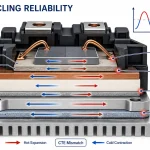
Reliability is essential because HPC liquid cooling is usually deployed for long service life, not short tests. ASHRAE’s focus on the cold plate as a heat exchanger reflects the need for stable performance over time. In practice, teams should ask whether the design can handle thermal cycling, vibration, and long coolant exposure. A well-made liquid cold plate must keep low thermal resistance while remaining stable across many operating hours.
Scalability matters just as much. A solution that works for one GPU server may not scale to an entire row unless the CDU, manifold, and facility water supply can support it. Industry best practice is to evaluate the full liquid cooling loop, not only the custom heat sink or server cold plate. That includes pressure drop limits, service intervals, and future rack density. For high power electronics cooling, the safest choice is the one that can grow with the workload without forcing a full redesign.
Before final selection, teams should compare the heat load, rack plan, and maintenance process side by side.
| Decision Factor | Question to Ask | Selection Impact |
|---|---|---|
| Heat load | How much heat per chip and per rack? | Drives heat sink vs cold plate choice |
| Scalability | Can the system expand with future servers? | Protects long-term investment |
| Serviceability | Can staff inspect and replace parts quickly? | Reduces downtime risk |
People Also Ask
How do custom heat sinks help address HPC cooling challenges in high-density systems?
Custom heat sinks improve heat removal by matching the specific power profile, airflow path, and space constraints of HPC hardware. In dense systems, they help prevent hot spots and keep components within safe operating limits.
Why are cold plates important in liquid cooling for HPC servers?
Cold plates act as the main heat exchanger between the processor or accelerator and the liquid cooling loop. They are critical for moving heat efficiently away from high-power components in modern HPC cooling solutions.
Can HPC cooling solutions still work effectively with 45°C coolant?
Yes, if the system is designed and validated for warmer coolant temperatures, it can still keep servers within their operating limits. This requires careful thermal design, including cold plate performance, coolant flow, and overall system integration.
What should be considered when selecting between a custom heat sink and a cold plate?
The right choice depends on heat load, available space, airflow, and whether the system uses air or liquid cooling. For very high-power CPUs or GPUs, cold plates are often preferred, while custom heat sinks can be effective in air-cooled or hybrid designs.
What makes a cold plate design effective for energy-efficient data center cooling?
An effective cold plate maximizes heat transfer while keeping pressure drop, material resistance, and flow imbalance under control. This helps reduce cooling energy use and improves overall system reliability.
How do custom heat sinks and cold plates work together in HPC cooling solutions?
They can be used as part of a layered thermal strategy, where one solution manages localized heat while the other removes larger thermal loads more directly. In many HPC systems, this combination helps balance performance, size, and efficiency goals.
What is the role of the server processor cold plate in the thermal stack?
The server processor cold plate sits directly on the heat source and transfers heat into the circulating liquid. Because it is one of the first interfaces in the thermal path, its design strongly affects cooling performance.
How do I choose the right HPC cooling solution for my application?
Start by evaluating heat density, component type, coolant or airflow options, and system reliability targets. Then match those requirements to a custom heat sink, cold plate, or hybrid approach that fits your thermal and mechanical constraints. Ecothermgroup can help align the solution with your application needs.