HPC Heat Sink Design for High-Density Servers and AI Accelerators
High-density servers and AI accelerators create serious heat challenges that can reduce performance and reliability if cooling is not managed properly. This article examines how HPC cooling solutions, especially heat sink design, help control rising temperatures and support stable operation in demanding data center environments, with practical insights from Ecothermgroup.
HPC Cooling Challenges
Rising Heat Loads
Modern AI accelerators and HPC CPUs now push far more heat into much smaller chip areas, so HPC cooling solutions must remove heat at the package level instead of relying only on room air. In many server designs, a single GPU can reach several hundred watts, and high-end accelerator cards may exceed 700 W, which makes thermal resistance in the server heat sink a key limit. This is why direct-to-chip cooling, liquid cold plate, and custom liquid cold plate designs are moving from niche options to common choices in high performance computing cooling.
Industry trends also show a clear shift in architecture. Discussions around AI data center cooling and HPC liquid cooling point to direct-to-chip cold plates, rear door heat exchangers, and immersion cooling as ways to keep dense racks stable under rising power. For Ecothermgroup and other suppliers of HPC heat sink and GPU cold plate systems, the main challenge is not only moving heat away, but doing it with low pressure drop, steady coolant flow rate, and controlled thermal resistance across CPU thermal management, GPU thermal management, HBM cooling, and VRM cooling.
| Challenge | Cooling Impact | Design Response |
|---|---|---|
| Higher chip power density | Heat forms in a small area | Use chip-level cooling and direct-to-chip cooling |
| Mixed CPU and GPU loads | Uneven thermal needs | Match CPU cold plate and GPU cold plate to package data |
| Higher rack heat load | Air cooling becomes less effective | Add liquid cooling loop and rack-level cooling support |
Practical design starts with exact TDP, package size, and mounting limits. A heat pipe module or vapor chamber heat sink can still help in some hybrid air and liquid cooling systems, but for dense AI accelerator cooling, the best results often come from a server cold plate with a custom heat sink layout that matches the full board thermal map. Safety reminder: thermal testing should always confirm real inlet temperature, coolant limits, and leak protection before deployment.
Density and Space Limits
High density server cooling is also difficult because the chassis has very little free space. As more compute is packed into one rack, larger fans can raise noise, power use, and service complexity, which is why many operators prefer data center cooling solutions that reduce airflow dependence. In this setting, a larger server heat sink is not always the answer; sometimes a smaller HPC heat sink paired with liquid cooling delivers better performance and frees room for memory, power stages, and cable routing.
Common practice is to co-design the device, airflow path, and facility system together. That means checking the full rack heat load, the coolant distribution unit, and the rear door heat exchanger before choosing a cooling method. Liquid cooling is widely seen as a strong complement to air because it helps increase compute density without pushing fans and ducts beyond practical limits. This is especially important in compact systems where pressure drop, service access, and mechanical clearance limit how much metal can be added around the socket.
- Measure the real power density of the rack, not just the chip nameplate value.
- Select direct-to-chip cooling when airflow alone cannot hold junction temperature.
- Verify pressure drop and coolant flow rate before finalizing the liquid cooling loop.
- Check maintenance access for pumps, hoses, and cold plate connections.
In short, the main HPC cooling challenges are rising heat flux and shrinking space. The best HPC cooling solutions combine accurate thermal data, a right-sized cold plate cooling design, and system-level planning. That is why Ecothermgroup-style engineering focuses on the full path from chip-level cooling to rack-level cooling, not only on one isolated heat sink.
Heat Sink Design Basics
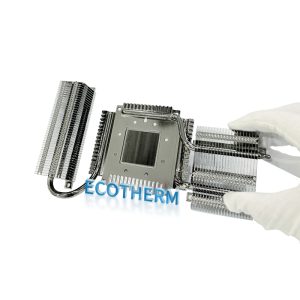
In HPC cooling solutions, the heat sink is the first step in moving heat away from a CPU, GPU, or AI accelerator before that heat reaches the rest of the data center cooling solutions stack. In modern AI data center cooling, the challenge is no longer just cooling a chip, but managing sustained high power density in a dense rack without creating too much pressure drop or noise. That is why HPC heat sink design now often works together with direct-to-chip cooling, liquid cooling loop planning, and rack-level cooling instead of being treated as a separate part.
For many high density server cooling systems, the main goal is low thermal resistance. In practice, that means the heat sink must pull heat from a small chip area into fins, heat pipes, a vapor chamber heat sink, or a cold plate cooling path fast enough for stable operation. Ecothermgroup and other engineers in HPC thermal management often stress that the heat sink must match the whole airflow design, because even a strong server heat sink can fail if the server fans, hot aisle conditions, or coolant flow rate are not aligned with the total system.
| Design Factor | Why It Matters in HPC | Common Choice |
|---|---|---|
| Thermal resistance | Controls how quickly heat leaves the chip package | Lower is better for CPU thermal management and GPU thermal management |
| Pressure drop | Affects fan load and airflow through dense racks | Kept as low as possible |
| Surface area | Improves heat transfer to air or liquid | Expanded fins, vapor chamber heat sink, or liquid cold plate |
Material and Structure
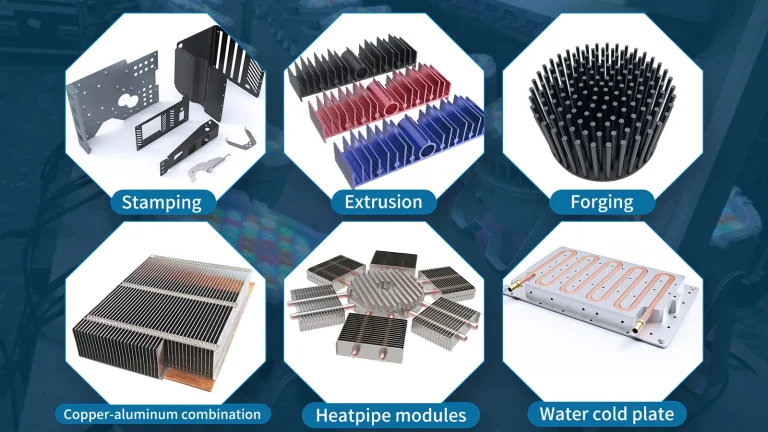
Most HPC heat sink designs use aluminum for the base structure because it is light, low cost, and easy to shape, while copper is often used in the base or heat spreader when heat flux is very high. For AI accelerator cooling, a custom heat sink may also include a heat pipe module or a custom liquid cold plate when the power level is beyond what air cooling can handle well. This is why direct-to-chip cooling and chip-level cooling are rising in modern HPC liquid cooling plans.
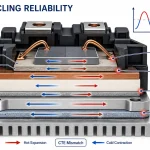
Structure matters as much as material. A GPU cold plate or CPU cold plate must stay flat, resist warping, and support long-term contact under repeated thermal cycling. Industry best practice is to design for the real load, not just short bursts, because many AI accelerator workloads run at high power for hours. Liquid cooling can help stabilize these temperatures, and recent data center studies point to direct-to-chip cold plates, rear door heat exchanger use, and immersion cooling as key tools for dense racks.
Fin Geometry and Surface Area
Fin geometry controls how much heat can move into the air or liquid around the sink. Narrow fins can increase surface area, but they also raise airflow resistance. Wider spacing improves airflow and may suit standard server heat sink designs, while tighter spacing can work better when fan pressure is high. In 2024, many high performance computing cooling projects used this trade-off to balance heat flux, pressure drop, and maintainability in AI accelerators and HPC CPUs.
A practical view is simple: more surface area helps only if the system can move air or coolant through it. That is why hybrid air and liquid cooling, rack-level cooling, and coolant distribution unit planning are now part of heat sink selection. In dense deployments, even a strong fin design should be checked against the available airflow path inside the server chassis.
Thermal Interface Considerations
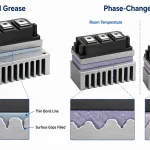
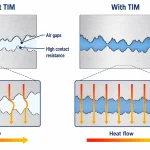
The thermal interface is often the weakest point in HPC thermal management. If the interface between the chip and the HPC heat sink is uneven, too thick, or poorly applied, thermal resistance rises fast. For this reason, engineers usually pay close attention to surface flatness, mounting force, and interface material choice. A thin, stable layer helps CPU cold plate and GPU cold plate systems work more effectively, especially where HBM cooling and VRM cooling also share limited space.
- Use a high-quality thermal interface material with stable performance over time.
- Check mounting pressure to avoid gaps and hot spots.
- Match the interface design to the expected coolant flow rate and chip power density.
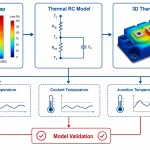
Common testing practice in high power electronics cooling is to validate the full assembly, not only the sink itself. For that reason, direct-to-chip cooling reviews and manufacturer tests often compare full module performance under real server heat sink conditions. Safety note: every custom liquid cold plate or custom heat sink should be tested for leak risk, clearance, and service access before deployment in production racks.

Liquid Cooling Integration
For HPC cooling solutions, liquid cooling integration is no longer a niche choice; it is becoming a core part of high-performance computing cooling for AI servers with very high power density. As rack power climbs past 30 kW and often toward 60 kW or more in dense AI data center cooling builds, air-only designs struggle to keep thermal resistance low enough for stable operation. That is why direct-to-chip cooling, cold plate cooling, and rack-level cooling must be planned together, not treated as separate upgrades.
Industry tests and field projects show a consistent pattern: moving heat closer to the chip lowers temperature rise at the source and reduces fan demand across the server. In practice, this can improve GPU thermal management, CPU thermal management, and even support HBM cooling and VRM cooling when the server heat sink is replaced by a liquid cold plate or a custom liquid cold plate. Ecothermgroup and other suppliers often design the HPC heat sink stage with the full liquid cooling loop in mind, because coolant flow rate and pressure drop affect the final thermal resistance as much as the metal base plate does.
| Integration Method | Best Use Case | Main Benefit |
|---|---|---|
| Direct-to-chip cold plate | High-power CPUs and GPUs | Strong chip-level cooling with low thermal resistance |
| Rear-door heat exchanger | Dense racks with mixed air and liquid cooling | Removes heat at the rack edge |
| Immersion cooling | Very high power density or special deployments | Uniform cooling around the full server |
Direct-to-Chip Cold Plates
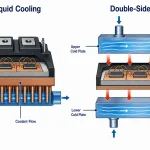
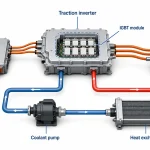
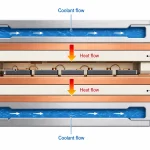
Direct-to-chip cooling is the most common path for modern AI accelerator cooling because it targets the hottest parts first. A GPU cold plate or CPU cold plate sits on the package and transfers heat into the liquid cooling loop, which can then move heat to a coolant distribution unit. This approach is widely chosen when a conventional server cold sink or heat pipe module cannot handle the heat flux from large accelerators. The main design concern is balance: more coolant flow rate lowers chip temperature, but it can also raise pressure drop and pump power.
Best practice is to match the cold plate contact area, channel design, and TIM quality to the expected load, then verify performance at real rack conditions. For example, a custom heat sink for one CPU may not work for a dual-GPU board with higher power density. In many deployments, the goal is not zero air cooling, but hybrid air and liquid cooling that keeps the remaining board components within safe limits.
Rear-Door Heat Exchangers
Rear-door heat exchangers are useful when operators want a less invasive step into HPC liquid cooling. They sit behind the rack and remove heat from exhaust air before it enters the room, which helps in mixed environments where full chip-level cooling is not yet practical. This option is often selected in data center cooling solutions that must protect existing airflow layouts while still supporting higher rack loads. It can also reduce the burden on chillers and large air handlers, a point often highlighted in data center planning reviews.
However, rear-door systems are not a full substitute for direct-to-chip cooling in very dense AI racks. They work best as part of a staged design, where the rack, server, and facility are sized together. That system-level view matters because thermal resistance at the server heat sink, rack airflow path, and facility return air all influence reliability.
Immersion Cooling Options
Immersion cooling is often discussed for extreme high power electronics cooling, especially where a large number of accelerators share one enclosure. By submerging the server in a dielectric fluid, the design can reduce hot spots and simplify some air-moving parts. It is attractive for certain HPC liquid cooling projects, but serviceability, fluid compatibility, and maintenance procedures must be checked carefully. A common industry concern is that not every OEM or ODM platform is ready for immersion without changes to boards, cables, or seals.
- Use direct-to-chip cooling for the highest heat flux devices.
- Use rear-door heat exchangers for gradual rack-level cooling upgrades.
- Use immersion cooling only when maintenance, safety, and compatibility are fully reviewed.
In all cases, liquid cooling integration should be validated with leak checks, service access planning, and real workload testing. The best HPC cooling solutions do not just remove heat; they protect uptime, support future GPU thermal management needs, and fit the long-term data center cooling strategy.
Design for AI Accelerators
Designing HPC heat sink systems for AI accelerators is now a co-design task, not just a cooling task. Modern GPU and TPU packages can push far higher power density than older server parts, so HPC cooling solutions must lower thermal resistance from the die to the coolant while also protecting HBM cooling, VRM cooling, and nearby interconnects. In practice, this is why many data center cooling solutions now use direct-to-chip cooling, liquid cold plate, and custom liquid cold plate designs instead of relying only on a server heat sink or a heat pipe module.
Industry reports on AI data center cooling and liquid cooling adoption have shown a clear shift toward direct-to-chip cold plates, rear door heat exchangers, and even immersion cooling for dense racks. That trend matches common engineering practice: when power density rises, airflow alone becomes less reliable, and high performance computing cooling must handle both steady heat flux and fast load changes. Ecothermgroup and other suppliers in this space often design around coolant flow rate, pressure drop, and interface quality because these factors directly affect chip-level cooling performance.
Power-Dense GPUs and TPUs
Power-dense accelerators create a tight thermal path from the silicon to the liquid cooling loop. A GPU cold plate or CPU cold plate must cover the hottest zones evenly while still keeping pressure drop low enough for the coolant distribution unit to work efficiently. This is especially important in high density server cooling, where a small rise in thermal resistance can reduce boost frequency and hurt AI accelerator cooling performance.
| Design Choice | Why It Matters for AI Accelerators | Typical Best Use |
|---|---|---|
| GPU cold plate | Spreads heat from large accelerator packages | High-power training servers |
| Vapor chamber heat sink | Helps move heat from hot spots to the plate | Hybrid air and liquid cooling |
| Custom heat sink | Matches package shape and board limits | Dense accelerator cards |
For many systems, direct-to-chip cooling is now preferred because it cools the source before heat spreads through the board. This is a common answer to the problem of rising chip heat loads in AI accelerators, and it is also why chip-level cooling is becoming central in HPC thermal management. A practical rule is to review package power, memory layout, and airflow paths together, because GPU thermal management and CPU thermal management are linked in the same chassis.
Hotspot Control
Hotspots often appear near HBM stacks, power stages, and package edges, so the best HPC heat sink design must manage these local peaks, not only average temperature. Liquid cold plate designs help because they can target the die area more directly than many air-based server heat sink options. In field discussions, engineers also note that a good thermal interface material can be just as important as the metal body, since poor contact quickly raises junction temperature under AI workloads.
- Use a low-resistance interface stack for die-to-cold-plate contact.
- Check for even mounting pressure across the full package.
- Verify coolant flow rate during peak training or inference loads.
- Review HBM cooling and VRM cooling at the same time as core cooling.
For safety and reliability, teams should avoid assuming one cold plate fits every board revision. Small changes in package height, board flex, or mounting force can change performance, so validation testing should include thermal resistance, pressure drop, and long-duration load cycling. In many cases, a custom liquid cold plate gives better hotspot control than a general-purpose design.
Rack-Level Thermal Balance
Even with liquid cooling, rack-level cooling still matters because residual air paths, cable density, and mixed-load cabinets can create uneven temperatures. This is why HPC liquid cooling is often paired with rack-level cooling tools such as rear door heat exchangers or hybrid air and liquid cooling layouts. In large deployments, the goal is to balance heat removal across the rack, not just from one accelerator card.
Common data center cooling solutions now combine cold plate cooling with cabinet planning so that coolant distribution unit capacity, loop routing, and service access all stay within safe limits. A balanced rack also improves uptime because it reduces thermal cycling on connectors and helps maintain stable performance across many nodes.
- Map the highest-power GPUs, TPUs, and memory modules first.
- Match the HPC cooling solutions to the real rack heat load.
- Confirm airflow is still adequate for non-liquid parts.
- Test for pressure drop and maintenance access before deployment.
For AI accelerator cooling at scale, the best result usually comes from combining rack planning with the right liquid cooling loop. That approach supports high power electronics cooling while keeping efficiency, density, and serviceability in balance.
Performance and Deployment
In HPC heat sink design for high-density servers and AI accelerators, performance is measured by more than peak temperature alone. A server heat sink must keep junction temperatures within safe limits during long full-load runs, because thermal throttling can reduce GPU and CPU output in real time. This is why HPC cooling solutions are now often built around direct-to-chip cooling, chip-level cooling, and liquid cold plate layouts rather than air alone. In dense AI racks, liquid cooling can keep temperatures more stable across packed systems, which is why many teams now evaluate a GPU cold plate, CPU cold plate, and custom liquid cold plate as part of the same deployment plan.
Deployment also depends on the full airflow and liquid path in the rack. In a crowded chassis, a high-fin HPC heat sink may lower thermal resistance, but it can also raise pressure drop and reduce usable airflow from server fans. That tradeoff is one reason high performance computing cooling projects often move toward hybrid air and liquid cooling, rear door heat exchanger support, or a liquid cooling loop with a coolant distribution unit. Ecothermgroup and similar suppliers often focus on this system-level view, since a good part still has to fit the real rack-level cooling environment.
| Deployment Option | Best Use | Main Benefit | Main Limit |
|---|---|---|---|
| Server cold plate | High power CPUs and GPUs | Strong heat removal at chip level | Needs careful contact and coolant flow rate control |
| Vapor chamber heat sink | Hotspots on air-cooled boards | Spreads heat quickly across the base | Still limited by chassis airflow |
| Immersion cooling | Very high density AI racks | Reduces local air cooling demand | Higher system change and service needs |
Efficiency and Reliability
Efficiency improves when thermal resistance stays low at the real heat flux seen in AI accelerator cooling and CPU thermal management. Recent data center cooling solutions guidance shows that direct-to-chip liquid cooling is gaining ground because air cooling becomes less effective as power density rises. In practice, the best HPC cooling solutions keep GPU thermal management stable under sustained load while also protecting HBM cooling and VRM cooling from secondary hotspots. Safe operation should always include margin for worst-case room temperature, fan curve changes, and coolant temperature rise.
Reliability depends on uniform mounting pressure, flat contact surfaces, and stable thermal interface material. Even a strong custom heat sink can underperform if the interface is poor, which is a common issue in AI data center cooling. For this reason, many teams test both thermal resistance and pressure drop before deployment.
- Check contact flatness before final install.
- Verify coolant flow rate against the cold plate spec.
- Confirm the rack can handle the added plumbing and service space.
Maintenance and Scalability
Maintenance is easier when the cooling path is modular. A liquid cold plate or custom liquid cold plate can be swapped faster than a full chassis redesign, while a heat pipe module or custom heat sink may still suit moderate-density systems. However, the larger the rack grows, the more important clean routing, leak checks, and service access become. Common industry practice is to plan maintenance around the longest service interval, not just the best lab result.
Scalability also means preparing for higher power density over time. A deployment that starts with air cooling may later need direct-to-chip cooling or rack-level cooling, especially as GPU counts and accelerator wattage increase. Rear door heat exchanger units and immersion cooling can extend the life of legacy rooms, but they require the right floor space and operational support.
HPC Cooling Solutions Strategy
The best strategy is to match the HPC cooling solutions to the chip load, chassis size, and operating model. For smaller upgrades, a better server heat sink or vapor chamber heat sink may be enough. For new AI builds, direct-to-chip cooling with a liquid cooling loop is often the safer long-term path. For very dense clusters, hybrid air and liquid cooling or full immersion cooling may offer better stability. In all cases, the design should balance thermal resistance, pressure drop, and service cost so deployment remains practical.
A final safety note: any high power electronics cooling plan should be validated in the real rack, not only in simulation. Field checks for noise, leak risk, mounting pressure, and coolant distribution are essential before full rollout.
People Also Ask
Why are direct-to-chip liquid cooling and cold plates becoming important in HPC cooling solutions?
They are becoming essential because AI accelerators and dense HPC systems produce far more heat than traditional air cooling can handle efficiently. Direct-to-chip cold plates remove heat from the processor quickly and help keep temperatures stable in high-power racks.
How do rear-door heat exchangers help in high-density server cooling?
Rear-door heat exchangers remove heat at the rack level before it spreads through the data center, improving thermal control in crowded deployments. They are often used as part of a broader liquid cooling strategy to support higher rack densities and better operational efficiency.
What makes heat sink design different for AI accelerators compared with standard servers?
AI accelerators usually have higher heat flux and more concentrated thermal hotspots, so the heat sink must move heat away faster and more evenly. That often means optimizing fin geometry, baseplate design, and airflow or liquid interface conditions for maximum thermal transfer.
Can liquid cooling work alongside traditional air-cooled heat sinks in HPC systems?
Yes, many deployments use hybrid designs that combine heat sinks, airflow, and liquid cooling components. This approach can improve thermal performance while making it easier to transition from air-based systems to more advanced HPC cooling solutions.
What are the biggest challenges in HPC cooling solutions for high-density servers?
The main challenges are rising chip power, limited space for airflow, and uneven heat distribution across dense racks. As densities increase, traditional air cooling becomes less effective, so designers must focus on better heat sink performance and more advanced cooling methods.
How do I choose the right heat sink for an HPC or AI workload?
The right heat sink depends on the chip’s power level, thermal footprint, and available cooling method. For high-performance AI hardware, the design must match the heat load and work well with the surrounding airflow or liquid cooling system.
What materials are commonly used in HPC heat sink design?
Aluminum and copper are the most common materials because they offer strong thermal conductivity and practical manufacturability. Copper is often used where maximum heat spreading is needed, while aluminum is preferred when weight and cost are important.
How can HPC cooling solutions improve performance and reliability in production deployments?
Effective cooling keeps components within safe operating temperatures, which helps maintain steady performance and reduce throttling. It also improves reliability by lowering thermal stress on servers, GPUs, and other accelerators over time. Ecothermgroup supports this approach with cooling strategies designed for demanding production environments.